Text Area
Basic
Let's say you want to create a simple textarea. So let's take an example how you do it, check it out below.
create a file at app/user/page.tsx
app/user/page.tsx
<AFormInput
  name={'description'}
  type={'textarea'}
  disabled={false}
  readonly={false}
  onChange={(value) => onInputChange(value)}
  onBlur={false}
  rows={3}
  cols={5}
/>
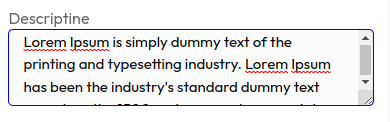
The above code will render TextArea like this.
Props
| Name | Type | Required | Description |
|---|---|---|---|
| name | string | Yes | name of the input. |
| disabled | boolean' | No | A disabled input element is unusable and un-clickable. |
| readonly | boolean | No | it specifies that an input field is read-only. A read-only input field cannot be modified (however, a user can tab to it, highlight it, and copy the text from it). |
| rows | number | No | The row attribute defines the row number of characters. |
| cols | number | No | The row attribute defines the row number of characters. |
Events
| Name | Type | Required | Description |
|---|---|---|---|
| onChange | (value: string) => void | No | The onchange event occurs when the value of an HTML element is changed. |
| onBlur | () => void | No | The onblur event occurs when an HTML element loses focus. The onblur event is often used on input fields. The onblur event is often used with form validation (when the user leaves a form field). |