DataTable
Intro
DataTable is to lessen the load and complexity of the developer in the simplest form.
Prerequisits
- CakePHP v4.0 with Asgard setup.
- You can clone the repo from
https://gitlab.com/ascendtis-boilerplates/asgard-v5
Basic
Let's say you want to create a DataTable for Admins Table. So let's take an example how you do it, check it out below.
create a file at templates/Asgard/Admins/index.php
Note: Our DataTable must resides in index.php so that it can easily accessible with /asgard/admins
templates/Asgard/Admins/index.php
  <data-table
    model="Admins"
    :headers="[
      {
        text: 'Name',
        field: 'name'
      },
      {
        text: 'Username',
        field: 'username'
      },
      {
        text: 'RegisteredAt',
        field: 'created_at',
        dateFormat: 'Do MMM YYYY'
      }
    ]"
  >
  </data-table>
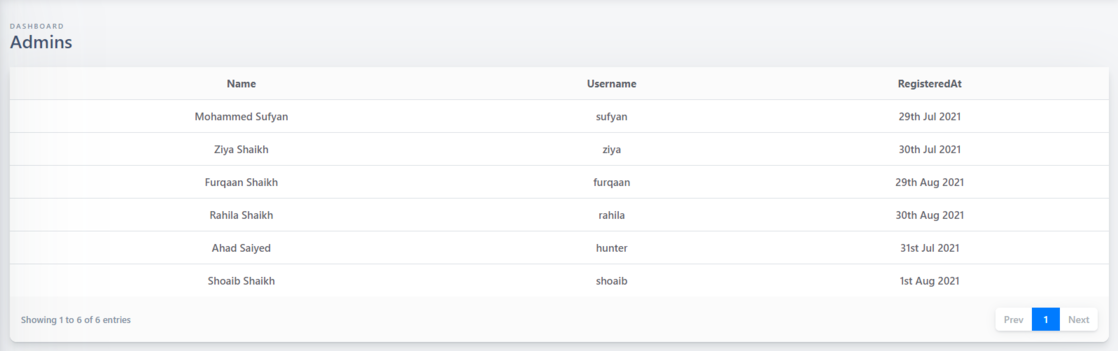
The above code will render DataTable like this.
Props
| Name | Type | Required | Description |
|---|---|---|---|
| model | string | Yes | Model name of a Table. |
| :headers | array | Yes | Fields which you want to display in DataTable. |
| datakey | string | No | If you have multiple DataTable in same page, then you have to define key for it's uniqueness. default: datatable |
| :query | object | No | It is used to filter the data based on conditions. |
| :limit | number | No | No. of records per page. default: 20 |
| :has-checkbox | boolean | No | Enable multiple records deletion. |
| base-url | string | No | If you want to use DataTable other than /asgard then you can specify it here. default: /asgard/ |
| :is-expand | boolean | No | Each row can be expandable. It will helpful if you want to show some fields only when user expands row. default: false |
| :single-expand | boolean | No | If it's true when you expand a row and if you have other row open it will be closed automatically. default: true |
| :header-actions | array | No | Action buttons can be added on top of DataTable (in Header) eg. Add Admin |
:headers
Headers are the fields which you wanted to display on DataTable. Look at the example below.
headers
  [
    {
      text: 'Name',
      displayAs: ({ first_name, last_name }) => first_name + ' ' + last_name
    },
    {
      text: 'Username',
      field: 'username'
    },
    {
      text: 'RegisteredAt',
      field: 'created_at',
      dateFormat: 'Do MMM YYYY'
    }
  ]
| Name | Type | Required | Description |
|---|---|---|---|
| text | string |