Sidebar
Intro
Sidebar is a menu, where you will find what is available in the entire template.
Prerequisits
- CakePHP v4.0 with Asgard setup.
- You can clone the repo from
https://gitlab.com/ascendtis-boilerplates/asgard-v5
Basic
Let's assume that you want to show the tables, which are available in the template. So let's take an example how you do it, check it out below.
create a file at templates/element/vue-components/sidebar.php
Note: Our Sidebar must resides in sidebar.php so that it can easily accessible with `/element/admin`
templates/element/admin/sidebar.php
  <side-bar
    title=" title"
    base-url="https://url.com/"
    :items="[
      {
        title: 'title',
        children: [
          {
            title: 'title',
            icon: 'iconName',
            url: '#'
          }
        ]
      },
      {
        title: 'title',
        children: [
          {
            title: 'title',
            icon: 'iconName',
            url: '#'
          }
        ]
      },
    ]"
  >
  </side-bar>
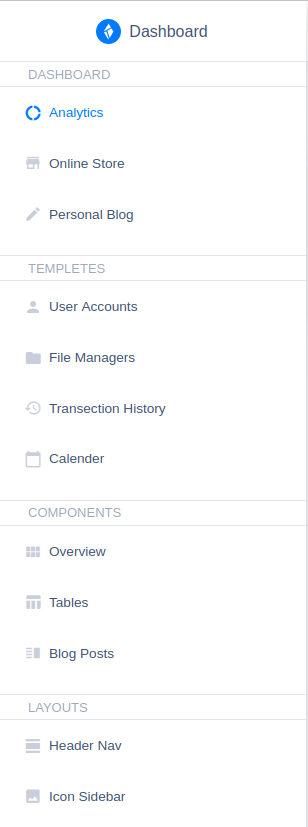
The above code will render Sidebar like this.
Props
| Name | Type | Required | Description |
|---|---|---|---|
| title | string | Yes | Title of Sidebar Table. |
| base-url | string | Yes | Base URL |
| :items | array | Yes | Fields which you want to display in Sidebar. |
:items
Items contains title and array of children, which you wanted to display on Sidebar. Look at the example below.
items
  [
    {
      title: 'title',
      children: [
        {
          title: 'title',
          icon: 'iconName',
          url: '#'
        }
      ]
    },
    {
      title: 'title',
      children: [
        {
          title: 'title',
          icon: 'iconName',
          url: '#'
        }
      ]
    },
  ]
| Name | Type | Required | Description |
|---|---|---|---|
| title | string | Yes | |
| :children | array | No | If you want array in item's element define it as children. |
:children
Children contains single table's details. Look at the example below.
children
  [
    {
      title: 'title',
      icon: 'iconName',
      url: '#'
    },
    {
      title: 'title',
      icon: 'iconName',
      children: [
        {
          title: 'title',
          icon: 'iconName',
          url: '#'
        },{
          title: 'title',
          icon: 'iconName',
          url: '#'
        },
      ]
    },
    {
      title: 'title',
      icon: 'iconName',
      url: '#'
    }
  ]
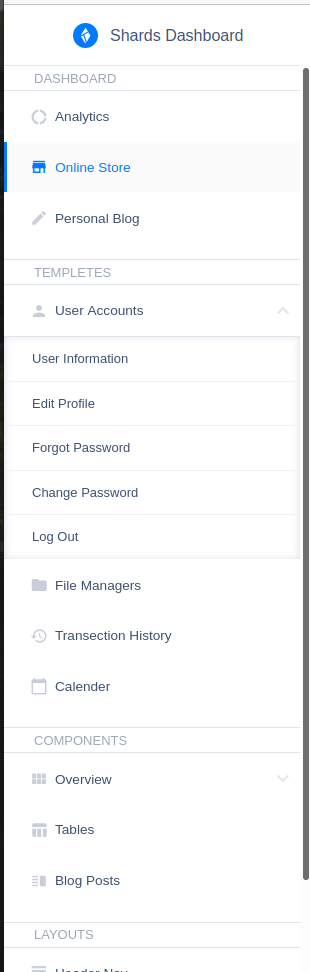
The above code will render like this.
| Name | Type | Required | Description |
|---|---|---|---|
| title | string | Yes | |
| icon | string | ||
| url | string | No | Define URL for redirection to the page. |
| :children | array | No | If you want another array in children's element define it as children. |